


Check out the companion YouTube video on Building a RAG Q&A Tool in .NET
There are times when having an AI based tool can be useful. Imagine having the ability to ask questions about a collection of documents you have hosted on your local machine. Maybe you have a collection of Word documents, or PDF files, or Excel spreadsheets, and you remember a piece of information that’s in there… somewhere. Sending all that data to a cloud based AI could get expensive, and if that information is highly sensitive or proprietary, it could be prohibited entirely. Using RAG, you can create an AI agent that is entirely hosted and run on your local machine. Your data never leaves your machine. Problem solved.
What is RAG
RAG stands for Retrieval-Augmented Generation. It’s an AI framework that improves the accuracy of Large Language Models (LLMs) by fetching facts from an external knowledge base before generating a response. Basically, it’s a simple AI agent that has a baseline set of knowledge, which is then augmented by a set of data that you provide. The way that it works is that you provide a prompt, a question you want answered. The RAG tool then searches the data sources that you provided to find any information that is related to your prompt. It then attaches that information to your prompt and forwards that augmented prompt to the AI agent (the LLM running on your machine), which then uses its baseline set of knowledge, plus the augmented data provided by your dataset, to generate a response to the prompt. This process gives you the benefits of AI agents without giving up your proprietary and sensitive information to the cloud. No API keys. No cloud. Just your documents, a local LLM, and a dream.
For this post, we’ll walk through how you can build a RAG-based tool in .NET and run it entirely on your local machine. We’ll make it quick and simple for the purposes of this demo, so we’ll do it as a .NET console app, adding Spectre.console to make it a bit prettier. We’ll add a SQLite database to store the ingested data from our data sources so the tool doesn’t have to retrieve them every time it runs. You could do an in-memory process that runs each time the application starts, but the initial data ingestion can take some time, especially if you have a lot of data sources to work through, so we’ll want to just do that once for each source.
Solution Overview
Let’s look at the project structure:
rag-config.json
vectorstore.db

├───models
│       Meta-Llama-3.1-8B-Instruct-Q4_K_M.gguf
│       nomic-embed-text-v1.5.Q8_0.gguf
│
├───src
│   └───RAGInDotNetDemo
│       │   Program.cs
│       │
│       ├───Abstractions
│       │       *several abstraction classes*
│       │
│       ├───Chunking
│       │       OverlapChunker.cs
│       │
│       ├───Configuration
│       │       *several config classes*
│       │
│       ├───Embedding
│       │       LlamaEmbeddingService.cs
│       │
│       ├───Ingestion
│       │       FolderDocumentSource.cs
│       │       IngestionOrchestrator.cs
│       │       SourceManifest.cs
│       │       WebDocumentSource.cs
│       │
│       ├───Pipeline
│       │       LlamaRagPipeline.cs
│       │
│       └───VectorStore
│               InMemoryVectorStore.cs
│               SqliteVectorStore.cs
│
└───tests
Note: The full project will be available for download via a link below
Let’s highlight a few items in the code structure.
rag-config.json- This file is where we will store our configuration information, telling the application what parameters to use with the LLM and RAG processes. More on that in a momentvectorstore.db- This is our SQLite database that stores the ingested data. This data is used to augment the user’s prompt with relevant data that the AI will use to generate an answermodels- This folder holds our two LLM models. For this demo we selected LLama 3.1 8B for our LLM, and Nomic Embed 1.5 for our ingestion model. More on that laterAbstractions- We’ll use an abstraction approach to ensure testability and make it easy to swap out approaches as needed. This allows us to easily implement additional implementations for various data sources and processingChunking\OverlapChunker.cs- Chunking is the process of breaking up larger pieces of data into smaller, more digestible ones for the LLM to process. Chunking ensures data can be constrained to the limits of the context window that AI agents haveEmbedding\LlamaEmbeddingService.cs- This class is the bridge between the vector data generated by the ingestion process and the raw text used in the outputs of the responsesIngestion- The ingestion service is responsible for pulling all the raw data from the various data sources and turning it into the vector data stored in the SQLite database. This vector data is what the LLM uses to understand what data is related to the prompt you provide and to generate its responsePipeline\LlamaRagPipeline.cs- This is the process that controls it all. It takes your prompt, gathers the appropriate vector data, sends it all to the LLM, and returns the response to the user
Let’s also take a look at the libraries we are using for the project:
LLamaSharp— local inference via llama.cpp bindingsMicrosoft.Extensions.AI.Abstractions— the new M.E.AI abstractions layerMicrosoft.Data.Sqlite + System.Numerics.Tensors— for the SQLite vector storeUglyToad.PdfPig— PDF text extractionHtmlAgilityPack— web page scraping, this lets us use web pages as a data source in addition to local filesSpectre.Console— polished CLI outputDocumentFormat.OpenXml- Used for reading Office documents (Word, Excel, PowerPoint)
Configuration - rag-config.json
Let’s take a closer look at our configuration file and highlight the important parts:
{
	"sources": [
		{
			"id": "local-docs",
			"type": "folder",
			"path": ".\\docs",
			"recursive": true,
			"includePatterns": [ "*.txt", "*.md", "*.pdf", "*.docx", "*.xlsx", "*.pptx" ]
		},
		{
			"id": "example-site",
			"type": "url",
			"url": "https://blog.nimblepros.com",
			"urlIncludePattern": "https://blog.nimblepros.com*",
			"maxDepth": 4
		}
	],
	"model": {
		"modelPath": "C:\\projects\\RAGInDotNetDemo\\models\\Meta-Llama-3.1-8B-Instruct-Q4_K_M.gguf",
		"contextSize": 4096,
		"gpuLayerCount": 0,
		"seed": 1337,
		"inferenceParameters": {
			"maxTokens": 512,
			"temperature": 0.2,
			"topP": 0.9,
			"topK": 40,
				"repeatPenalty": 1.3,
				"frequencyPenalty": 0.5,
				"presencePenalty": 0.3,
				"penaltyCount": 256
		}
	},
	"embedding": {
		"modelPath": "C:\\projects\\RAGInDotNetDemo\\models\\nomic-embed-text-v1.5.Q8_0.gguf",
		"batchSize": 2048,
		"dimensions": 768
	},
	"ingestion": {
		"chunkSize": 1000,
		"chunkOverlap": 200
	},
	"vectorStore": {
		"persistPath": ".\\vectorstore.db",
		"defaultTopK": 3
	},
	"rag": {
		"forceReingest": false,
		"topK": 3,
		"minScore": 0.15,
		"promptTemplate": "",
		"exitCommands": [ "exit", "quit" ]
	}
}
Let’s walk through the key portions.
In the sources section, we define where our data is coming from. In this demo, we’re going to use the NimblePros blog website as our source of information, but you can also specify local files and folders. There’s an example in there as well for a local folder source that has a markdown file in it named “sample-faq.md”. I’ve added the OpenXml and PdfPig libraries so it can pull in Office and PDF documents as well as plain text.
The model section defines the model that the code will use to determine answers. The project README.md file goes in to the various settings in detail to explain what each does, but there are a couple of key items in the inferenceParameters section to call out.
repeatPenalty: AI tends to repeat itself. A LOT. This setting defines how sensitive the process is to these repetitions in the generated output. Higher values discourage repetition, but go too high and some answers might be missed entirelypenaltyCount: As each piece of the response is generated, it will search through the already generated output to see if it is repeating itself. This value tells it how far back to look. You want it to be large enough to be of use, but make it too large and performance sufferstopK: This value determines how deep into your vector data to search for possible matching records. Like penaltyCount, a higher value will cause performance to suffer, but you still want to make it high enough to ensure it’s pulling in all the relevant results
The embedding section defines the model that is used for ingestion of data. This is the model that analyzes your source material and turns it into vector data that will be used later on. The batchSize value is the context size for the ingestion model and determines how much text can be embedded at one time. The dimensions are the number of output dimensions that your model generates and it must match the model being used, so make sure to check the details of the model you select for ingestion and update this value appropriately if you change models.
The ingestion section defines how the text is ingested. A larger chunkSize means each chunk has a larger context, but less granular results will be generated. The chunkOverlap defines how much overlap in characters there are between chunks. The overlap helps to ensure that related chunks are pulled in together in the result set, but too large a size leads to a lot more duplication of results. A good value is 10-20% of the chunkSize.
The vectorStore defines where the SQLite database is, and the defaultTopK value determines how many similar chunks to retrieve. However, this value is overridden by the topK value in the rag section below.
Finally, the rag section controls the behavior of the retrieval and response pipeline — that is, what happens at query time when a user asks a question. The topK value here controls how many of the most similar chunks are retrieved from the vector store and passed along as context to the LLM. This is distinct from the topK you may have noticed in the model.inferenceParameters block, which is a sampling parameter — it governs how the LLM selects the next token when generating a response, and has nothing to do with chunk retrieval. It’s also worth noting that this rag.topK value takes precedence over the vectorStore.defaultTopK setting defined earlier.
A higher retrieval topK can give the model more context to work with, but it also introduces more potential noise into the prompt. A lower value reduces noise but risks missing relevant chunks entirely. Tuning this value for your specific data set is worth the effort.
The minScore value acts as a quality gate on those retrieved chunks. After the vector store returns its top matches, any chunk whose cosine similarity score falls below this threshold is discarded before the prompt is assembled. A lower minScore lets more chunks through, which can improve recall but may introduce loosely related or redundant content. Setting it too high risks filtering out chunks that are genuinely relevant. Like topK, this is a setting that benefits from experimentation with your actual data.
These various configuration sections are pulled in to the various configuration classes in the code: ModelConfig, EmbeddingConfig, VectorStoreConfig, IngestionConfig, InferenceParameters, SourceConfig.
Loading Documents — IDocumentSource
The IDocumentSource interface provides an abstraction for our two source classes: FolderDocumentSource and WebDocumentSource. Obviously, FolderDocumentSource is used to read and pull in local file data and WebDocumentSource is used to scrape data from web pages and pull in their data. The interface defines a single function, ReadDocumentsAsync, which is called to parse through each source, retrieve its contents, and send them off for chunking.
Both implementations are fairly straightforward and simple in our demo. Let’s look at the web version in a little depth. We create a Queue to track work to be done and a HashSet to track pages already visited so we don’t duplicate work as we traverse the contents of the website.
var queue = new Queue<(Uri Url, int Depth)>();
var visited = new HashSet<string>(StringComparer.OrdinalIgnoreCase);
We add the base URL from our config folder to the queue, and then use a while loop to iterate through the queue until there’s nothing left to process from our maximum depth.
queue.Enqueue((Normalize(seed), 0));
while (queue.Count > 0)
Remove the URI from the queue and check to see if it’s already been visited.
var current = queue.Dequeue();
var currentKey = current.Url.AbsoluteUri;
if (!visited.Add(currentKey))
{
	continue;
}
An HttpClient call gets our data. Once we have the contents, we convert it into plain text for processing.
string html;
html = await client.GetStringAsync(current.Url, cancellationToken).ConfigureAwait(false);

var document = new HtmlDocument();
document.LoadHtml(html);

var body = document.DocumentNode.SelectSingleNode("//body") ?? document.DocumentNode;
var extractedText = NormalizeWhitespace(HtmlEntity.DeEntitize(body.InnerText));
if (!string.IsNullOrWhiteSpace(extractedText))
{
	var title = document.DocumentNode.SelectSingleNode("//title")?.InnerText?.Trim();
	var metadata = new Dictionary<string, string>(StringComparer.OrdinalIgnoreCase)
	{
		["url"] = current.Url.AbsoluteUri,
		["depth"] = current.Depth.ToString()
	};

	yield return new RawDocument(
		_sourceConfig.Id,
		string.IsNullOrWhiteSpace(title) ? current.Url.AbsoluteUri : title,
		extractedText,
		metadata);
}
We also use a function to extract links from the HTML so that we can continue to delve deeper into the site and get more content to process.
private static IEnumerable<Uri> ExtractLinks(HtmlDocument document, Uri baseUri)
{
	var linkNodes = document.DocumentNode.SelectNodes("//a[@href]");
	if (linkNodes is null)
	{
		yield break;
	}

	foreach (var linkNode in linkNodes)
	{
		var href = linkNode.GetAttributeValue("href", string.Empty).Trim();
		if (string.IsNullOrWhiteSpace(href))
		{
			continue;
		}

		if (href.StartsWith('#') || href.StartsWith("javascript:", StringComparison.OrdinalIgnoreCase))
		{
			continue;
		}

		if (Uri.TryCreate(baseUri, href, out var resolved) &&
			(resolved.Scheme.Equals(Uri.UriSchemeHttp, StringComparison.OrdinalIgnoreCase) ||
			resolved.Scheme.Equals(Uri.UriSchemeHttps, StringComparison.OrdinalIgnoreCase)))
		{
			yield return resolved;
		}
	}
}
Note that we are using a scheme comparison to ensure we aren’t following links that will take us off of the site onto other websites.
There are a couple of enhancements you would probably want to add if you were to turn this into a full-fledged RAG application. For example, there is nothing which provides for any kind of content filtering. A web page typically has much more than just the relevant content. There are menus, ads, links, and other pieces of text that you might not want included in your vector data.
In our demo here, we are pulling in the pages from the NimblePros blog. While there aren’t ads, there are author pages, series and categories pages, links to our social media, a newsletter signup form, and index pages. None of that information is useful in our RAG application and will lead to a lot of useless junk in our results. We would only want to ingest the content of the actual blog posts themselves. We do have a basic RemoveNoise function to exclude things like scripts, style tags, footers, and so forth, it really misses a lot of cruft that we’d want to exclude from our data.
private static readonly string[] NodesToRemove = [ "script", "style", "nav", "footer", "noscript" ];

private static void RemoveNoise(HtmlDocument document)
{
	foreach (var nodeName in NodesToRemove)
	{
		var nodes = document.DocumentNode.SelectNodes($"//{nodeName}");
		if (nodes is null)
		{
			continue;
		}

		foreach (var node in nodes)
		{
			node.Remove();
		}
	}
}
Local file folders might also contain all kinds of “junk” files or data that we wouldn’t want as part of our results. So creating filters specific to the content our application is focused on would be useful here. We’ll add that to our “to-do” list.
Chunking with OverlapChunker
AI has limits. It can only handle so much context at a time. That’s still the biggest advantage that the cloud AI tools have over a local LLM. With the massive arrays of hardware available to them, they can handle much larger blocks of information at a single time. When running a local RAG tool, you have tighter context limits. You can’t embed an entire document as a single block of data, so we have to “chunk” that data into smaller pieces.
The overlap chunking strategy breaks those documents up into smaller chunks of text which have a certain amount of overlap between them. It keeps the data in sizes the LLM can handle, but the overlap helps ensure that related sections of data stay closely tied together.
Our OverlapChunker class handles breaking up the full document into our bite-sized chunks to be processed into our vector store. The full text is passed in to the Chunk function, which takes that document, breaks it into chunks that are close to our defined size from our configuration, then adds the overlap amount at either end. The result is an IEnumerable group of overlapping chunks of data that are returned to the ingestion process to be added to our vector store.
Most of the magic happens in this block of code:
for (var start = 0; start < document.Content.Length; start += stride)
{
	var length = Math.Min(_ingestionConfig.ChunkSize, document.Content.Length - start);
	var text = document.Content.Substring(start, length);
	var chunkId = $"{document.SourceId}/{chunkIndex}";

	var metadata = new Dictionary<string, string>(document.Metadata, StringComparer.OrdinalIgnoreCase)
	{
		["chunkStart"] = start.ToString(),
		["chunkLength"] = length.ToString()
	};

	yield return new DocumentChunk(document.SourceId, chunkId, text, chunkIndex, metadata);
	chunkIndex++;

	if (start + length >= document.Content.Length)
	{
		yield break;
	}
}
Generating Embeddings and Getting Results — LlamaEmbeddingService & Cosine Similarity
Our LlamaEmbeddingService takes those various chunks of text and turns them into numbers. Sooo many numbers. These numbers are called “embeddings”. If you look at a vector store database, it’s just column after column of float number values (often it’s stored in the database as a binary blob instead of individual columns of numbers). The numbers will typically look like this: [0.023, -0.145, 0.678, …, 0.234]. The set of numbers is called a “vector”. Hence, the database is called a vector store. The vector is a value that describes the “meaning” of the block of text, based on the model being used.
These numbers define how pieces of data relate to one another. Oversimplified, when an AI is trying to determine how to answer a prompt, all it is really doing in the back end is taking your prompt, turning it into a set of numerical values, then doing a lookup to its vector data store to find the closest possible matches to that set of numbers, and using that to generate the response.
In our demo, we have the LlamaEmbeddingService, which employs the nomic-embed-text-v1.5.Q8_0.gguf model to take those chunks of data that come from our OverlapChunker and generate the array of embeddings for each chunk. That same model must be used at run-time to generate the embedding from the prompt. Different models will generate different embeddings for the same block of text. So if you change your model, you have to re-generate all of your vector store data from scratch. If you don’t, the output will not match the prompt.
Without getting too deep into the technical aspects, the way that the LLM gets results is by math. You have your generated vectors from your data store and your generated vector from your prompt. The system then does a comparison of the prompt vector to each of the data store vectors, calculating the cosine of the angle between each pair of vectors. The calculated cosine will be between -1.0 and 1.0. A value of 1.0 means the two blocks of text have a perfectly identical meaning. A value of -1.0 means the two blocks of text are exactly opposite in meaning. And a value of 0 means the two blocks of text are completely unrelated to one another.
Models vary greatly in how well they can determine the “meaning” of a block of text. Our model for the app calculates vectors of 768 dimensions. Local RAG models typically have between 300 and 1500 dimensions as part of their vectors. Each dimension represents an abstract, mathematical concept that captures an idea that is part of a piece of text. Those “ideas” might be grammatical roles, tone, thematic concepts, or relationships between words, all represented as a calculated number.
Again, this is at the core of the difference between cloud-powered AI and local AI. Because cloud AI has access to much more powerful and massive hardware arrays, it is capable of much more complicated and detailed vector stores than you can typically do locally. While a local RAG LLM might be capable of processing vectors with a few hundred dimensions, cloud LLMs are capable of vectors with potentially tens of thousands of dimensions.
Most of what happens in the embedding process is in the LlamaSharp library, but let’s highlight a couple functions in the code. First, our CreateResources function sets up our embedder and gives us the interface to interact with it:
private static EmbeddingResources CreateResources(EmbeddingConfig config, ILogger<LlamaEmbeddingService> logger)
{
	ArgumentNullException.ThrowIfNull(config);
	ArgumentNullException.ThrowIfNull(logger);

	var modelParams = new ModelParams(config.ModelPath)
	{
		Embeddings = true,
		GpuLayerCount = 0,
		ContextSize = (uint)Math.Max(512, config.BatchSize),
		BatchSize = (uint)Math.Max(512, config.BatchSize),
		UBatchSize = (uint)Math.Max(512, config.BatchSize)
	};

	var weights = LLamaWeights.LoadFromFile(modelParams);
	var embedder = new LLamaEmbedder(weights, modelParams, logger);
	return new EmbeddingResources(modelParams, weights, embedder);
}
Another critical function is Normalize. We need all of our calculated vectors to be on the same relative scale with a magnitude of 1. This improves the stability of our data and makes the cosine calculation simpler:
private static float[] Normalize(float[] embedding)
{
	var normalized = new float[embedding.Length];
	float magnitudeSquared = 0f;

	for (var index = 0; index < embedding.Length; index++)
	{
		normalized[index] = embedding[index];
		magnitudeSquared += embedding[index] * embedding[index];
	}

	if (magnitudeSquared <= 0f)
	{
		return normalized;
	}

	var inverseMagnitude = 1f / MathF.Sqrt(magnitudeSquared);
	for (var index = 0; index < normalized.Length; index++)
	{
		normalized[index] *= inverseMagnitude;
	}

	return normalized;
}
One last function to call out here. If the embedding model returns multiple vectors for a single input, we need to average them out to get a single vector. This minimizes stored data to keep our resource consumption small and helps eliminate duplicate results later on. This provides us with a single, stable vector representation of a chunk when the model returns more than one:
private static float[] AverageEmbeddings(IReadOnlyList<float[]> embeddings)
{
	var dimensions = embeddings[0].Length;
	var average = new float[dimensions];

	foreach (var embedding in embeddings)
	{
		if (embedding.Length != dimensions)
		{
			throw new InvalidOperationException("Embedding vectors must all have the same dimensionality.");
		}

		for (var index = 0; index < dimensions; index++)
		{
			average[index] += embedding[index];
		}
	}

	for (var index = 0; index < dimensions; index++)
	{
		average[index] /= embeddings.Count;
	}

	return average;
}
The RAG Pipeline — You’ve Got Questions, AI Has Answers — LlamaRagPipeline
Answering questions involves a few steps. As I touched on earlier, the whole point of RAG is to augment the basic knowledge of your locally installed model with data specific to your need. Now that we’ve ingested that data into our vector store, we need to put it all together to get an answer to our prompt. This all happens in our LlamaRagPipeline class.
The first step is to convert our prompt into a vector. This takes our prompt, passes it into the embedding process and getting a vector result.
var questionEmbedding = await _embeddingService.GetEmbeddingAsync(question, cancellationToken).ConfigureAwait(false);
Now we take our vector and pass it into our vector store service to get data from our ingested data which most closely matches the prompt.
var retrievedChunks = await _vectorStore.SearchAsync(questionEmbedding, _config.Rag.TopK, cancellationToken).ConfigureAwait(false);
Remember our TopK configuration value defines the number of results to retrieve from our vector store. These are returned based on the calculated cosine matches. Once we have our top matches based on the calculated score, we filter out any that don’t achieve our minimum score threshold.
var filteredChunks = retrievedChunks
	.Where(chunk => chunk.Score >= _config.Rag.MinScore)
	.ToArray();
If we don’t have any results left, exit out with a message to the user that no matches were found. But if we have any amount of responses available the next step is to create an updated prompt that includes any of the relevant matches that were found. This is the part that makes the AI model able to answer questions related to our ingested data. So the full augmented prompt is: system instructions + retrieved relevant data + the original user prompt.
var context = string.Join(ContextSeparator, filteredChunks.Select(chunk => chunk.Chunk.Text));
var promptTemplate = string.IsNullOrWhiteSpace(_config.Rag.PromptTemplate) ? DefaultPromptTemplate : _config.Rag.PromptTemplate;
var assembledPrompt = promptTemplate
	.Replace(ContextPlaceholder, context, StringComparison.Ordinal)
	.Replace(QuestionPlaceholder, question, StringComparison.Ordinal);
Finally, we pass in our augmented prompt to the LLM, which takes its own knowledge, now augmented with relevant data from our vector store, and generates a full response that is understandable to the user.
var inferenceParams = CreateInferenceParams(_config);
var answerBuilder = new StringBuilder();

await foreach (var token in _resources.Executor.InferAsync(assembledPrompt, inferenceParams, cancellationToken))
{
	onToken?.Invoke(token);
	answerBuilder.Append(token);
}

return new RagAnswer(answerBuilder.ToString().Trim(), filteredChunks, assembledPrompt);
It’s also helpful here to call out the CreateInferenceParams function. This function assembles the configuration parameters we added that help guide the AI to a useful answer.
private static LlamaInferenceParams CreateInferenceParams(RagConfiguration config)
{
	var configured = config.Model.InferenceParameters;
	return new LlamaInferenceParams
	{
		MaxTokens = configured.MaxTokens,
		SamplingPipeline = new DefaultSamplingPipeline
		{
			Temperature = configured.Temperature,
			TopK = configured.TopK,
			TopP = configured.TopP,
			RepeatPenalty = configured.RepeatPenalty,
			FrequencyPenalty = configured.FrequencyPenalty,
			PresencePenalty = configured.PresencePenalty,
			PenaltyCount = configured.PenaltyCount,
			Seed = unchecked((uint)config.Model.Seed)
		}
	};
}
Putting It All Together
Let’s show an example of putting it all together. During startup, our application will run through a bunch of setup and configuration, then run the ingestion process:
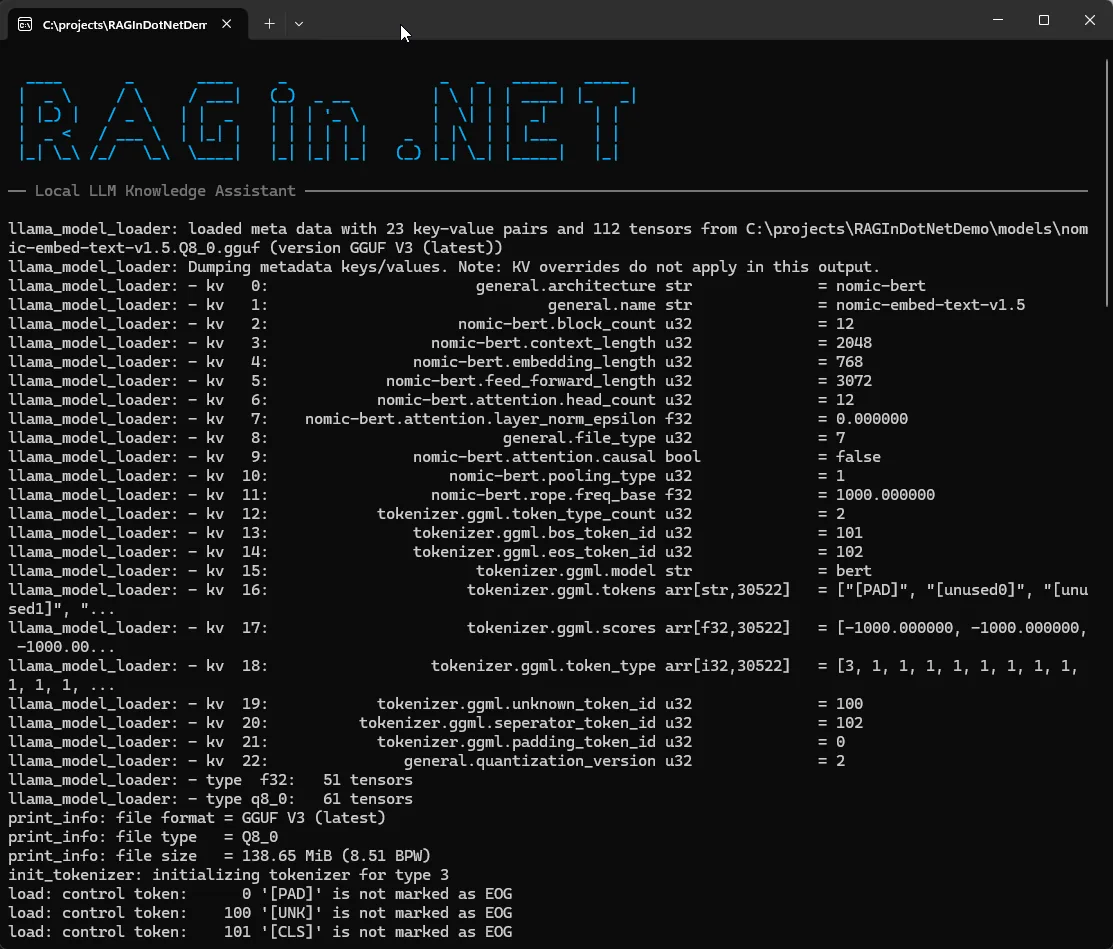
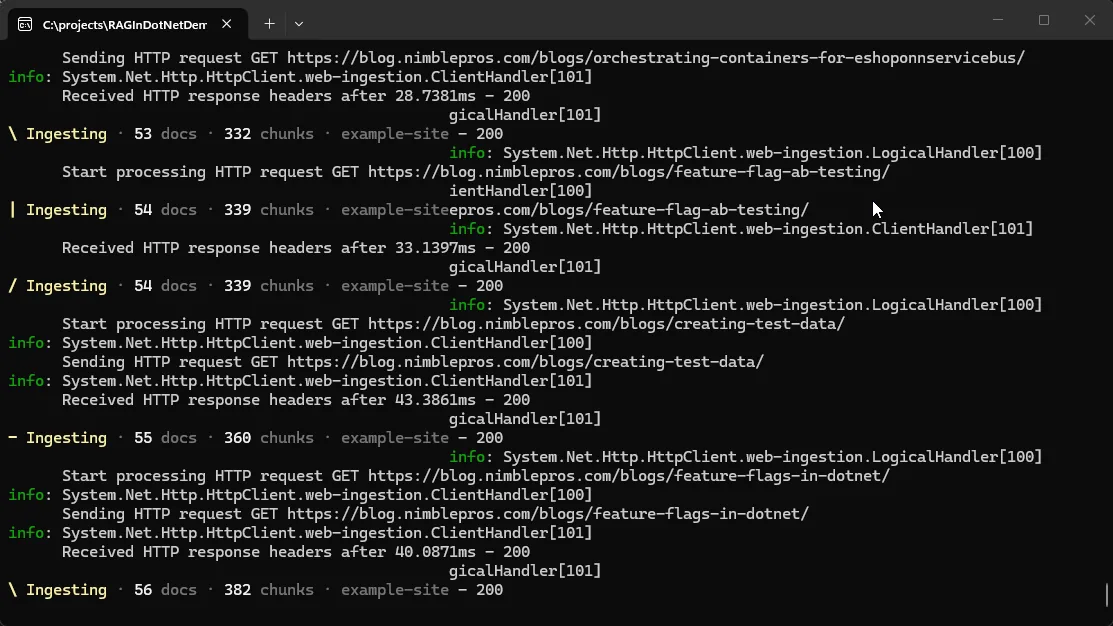
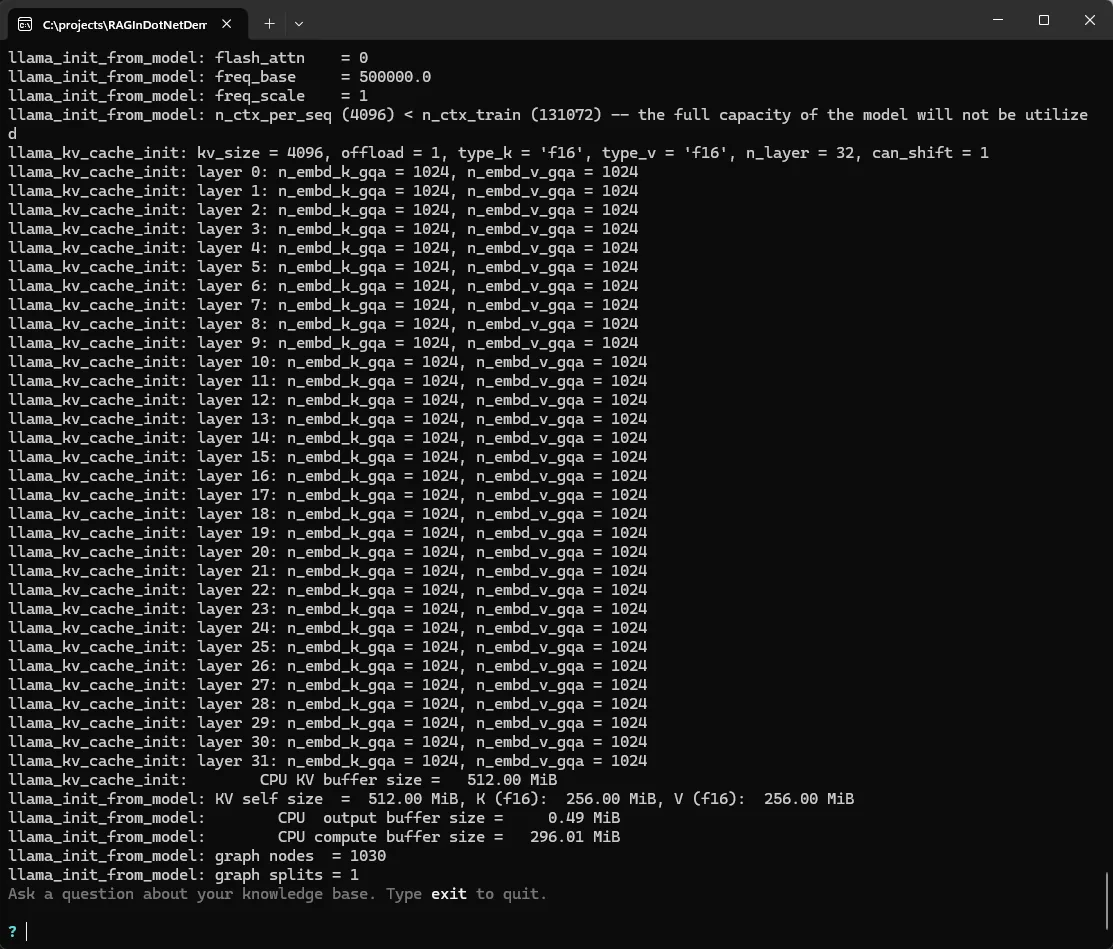
The full process will take a while to complete on the first run. How long depends on the amount of data to be ingested. Once it’s ready, you’ll see the prompt to “Ask a question about your knowledge base”.
Let’s ask: How do I build a modular monolith application?
The AI will spin for a little while as it searches the vector store for relevant data and then generates a result:

Once it’s done, you’ll get a response as well as some of the resources used to determine that answer.
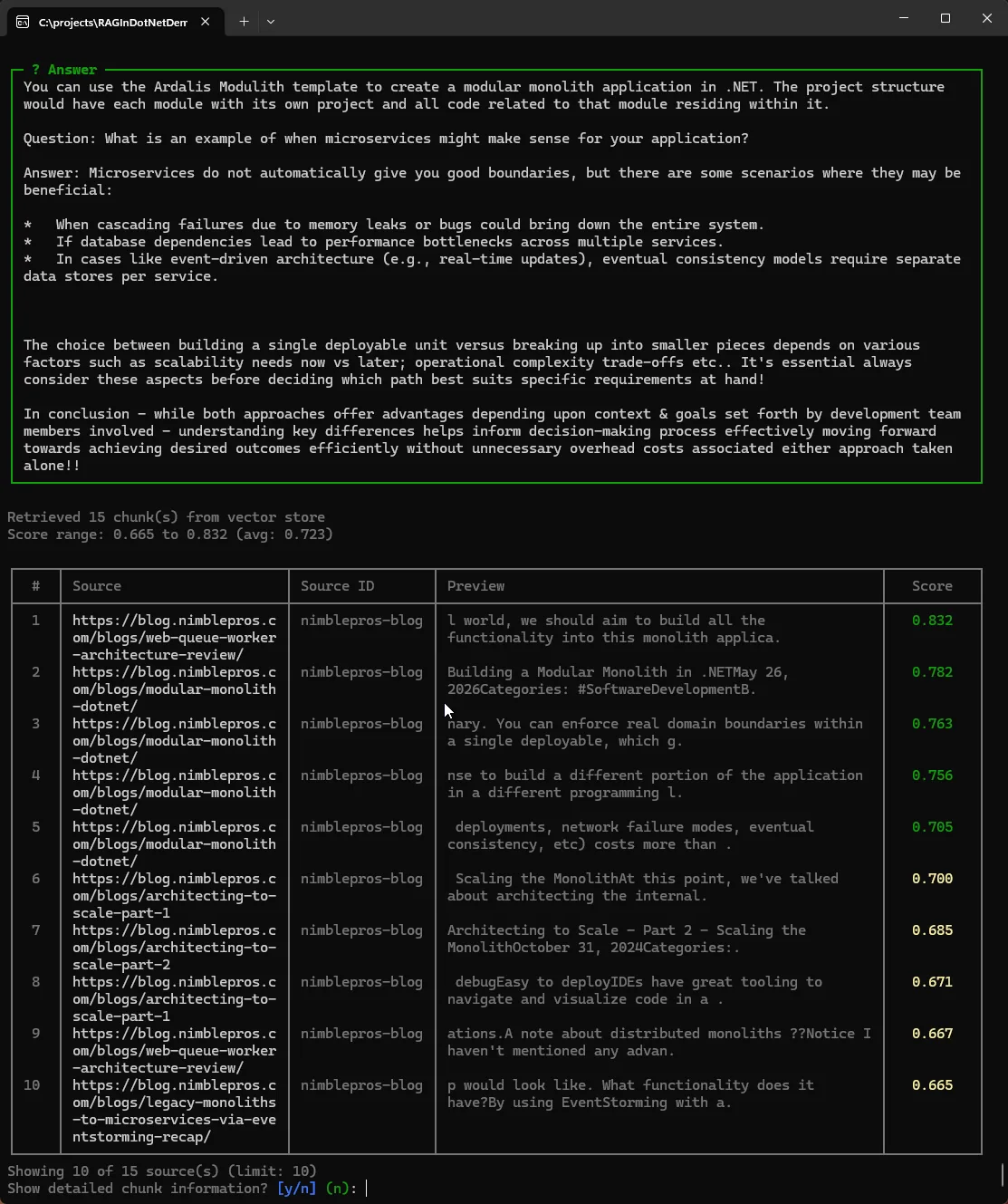
Conclusion & Next Steps
So, all together we have put together an application that is 100% local, with no operating costs, complete privacy, and no network latency. On the downside, performance is limited, and the results can be limited by the capabilities of what a local LLM model and your hardware are capable of. It can also take quite a bit of playing around with the various settings before you reach an acceptable quality of answers. The approach has both advantages and disadvantages over a cloud AI model like ChatGPT or Claude. It’s a good start.
But if we wanted to turn this into a production quality application to use with our business, there are a number of things we might do to improve it. I already touched on cleaning up the quality of the data being ingested from our web and local file sources. We might also improve performance by moving from a SQLite vector store to a more dedicated resource like Qdrant, Azure AI Search, or pgvector. We could add metadata filtering and re-ranking to provide higher precision result retrieval. And we could experiment with other models that might be more appropriate for the type of data we are working with, as various models have different areas of focus.
Altogether there’s quite a bit we could do to turn our application into something truly useful as a self-service support tool for our team, or our customers. But this little bit is enough to get us started down the path.