
What's New in Aspire 17


Barret Blake, Architect
Aspire doesn’t sit still. Back in September, I wrote a catch-up post for anyone who hadn’t looked at Aspire since 2025, and it was a long list. Aspire 17 is another big step, and this one changes the way a C# AppHost is put together.
Aspire 17 shipped on November 17, and the team’s release announcement calls it “ready for primetime.” This release is aimed at teams using Aspire for real enterprise apps, and at the platform teams building internal tooling on top of it.
And yes, Aspire jumps straight from 13.x to 17. If you’re wondering what happened to 14, 15, and 16, the announcement’s only explanation is a wink that those numbers weren’t ready for primetime. Before you run aspire update, check the changes below for anything that touches your AppHost code.
Here are the highlights.
Goodbye, Aspire.AppHost.Sdk
Since the beginning, a C# AppHost project has started with a special SDK:
<Project Sdk="Aspire.AppHost.Sdk/13.1.0">
That SDK did two things behind the scenes. It turned every ProjectReference in your AppHost into a generated Projects.* class that you could pass to AddProject<T>, and it pulled in the dashboard and DCP packages for your platform.
In Aspire 17, Aspire.AppHost.Sdk is obsolete and reports the ASPIRE012 diagnostic. It still works, so your existing AppHost will still build, and there’s no removal date yet. But the future is a plain old .NET project:
<Project Sdk="Microsoft.NET.Sdk">

  <ItemGroup>
    <PackageReference Include="Aspire.Hosting.AppHost" Version="17.x.x" />
    <PackageReference Include="Aspire.Hosting.Dotnet" Version="17.x.x" />
  </ItemGroup>

</Project>
Replace 17.x.x with the actual release version. If you use Central Package Management like we do at NimblePros, put those versions in Directory.Packages.props and leave them off the PackageReference items. One gotcha here: new AppHost templates currently emit explicit versions, so if you create a new AppHost underneath an existing CPM root, NuGet will complain with NU1008 until you move them.
So where do the dashboard and DCP come from now? From the Aspire CLI. C# AppHosts now require the CLI bundle. Aspire can use a CLI on your PATH or acquire one through dnx. If you rely on dnx in CI, make sure the build agent has a .NET SDK that provides it and can reach the package feed. For local CLI commands, you can install the CLI.
Project Resource v2: AddDotnetProject
The other half of the SDK’s job, generating those Projects.* classes, is replaced by a new way to add .NET projects. It’s called Project Resource v2, and it’s the biggest change in this release for C# developers.
Here’s what we’ve all been writing for the last couple of years:
var api = builder.AddProject<Projects.Api>("api")
    .WithReference(database);
And here’s the Aspire 17 version:
var api = builder.AddDotnetProject("api", "../Api/Api.csproj")
    .WithReference(database);
Instead of a generated type, you give Aspire the path to the project. The path is relative to the AppHost directory, not wherever your terminal happens to be. You can point it at a .csproj, .fsproj, or .vbproj file, a directory that contains exactly one project, or even a file-based C# app (.cs). That’s right, F# and VB projects are now supported as well. And because there’s no ProjectReference, your services don’t even have to live in the same solution as your AppHost. A TypeScript or Go AppHost can add .NET projects the same way.
Aspire also takes over building those projects. Previously, building the AppHost meant walking the entire graph of referenced services before you ever saw the dashboard. Now the AppHost and dashboard start first, and Aspire coordinates the service builds before launching them. Better still, each project resource gets a Rebuild action that picks up your source changes without restarting the AppHost. One caveat: aspire run --watch doesn’t support AddDotnetProject resources yet.
All six AddProject overloads are now marked obsolete, and AddCSharpApp is obsolete too. Like the SDK, they still work, so you can migrate one resource at a time. But don’t treat this as a simple find-and-replace. There are a few things to watch:
- The return type is different.
AddProjectreturnsIResourceBuilder<ProjectResource>.AddDotnetProjectreturnsIResourceBuilder<DotnetProjectResource>, and those two resource types aren’t related. If you have helper methods or extension methods that take or return the old type, they’ll need updating. For extension methods, constrain on the capability you need, likeIResourceWithEnvironmentorIResourceWithEndpoints, rather than a concrete project type. - Launch profiles changed shape. The overloads that took a launch profile name are gone. You pass an options callback instead, like
options => options.LaunchProfileName = "https". And be careful withnull. In the old string overload, passinglaunchProfileName: nullmeant “no launch profile.” In the new model, anullprofile name means “use the default profile.” To turn profiles off, setoptions.ExcludeLaunchProfile = true. - Don’t guess the path from the class name.
Projects.Company_Apidoesn’t necessarily meanCompany.Api.csproj. Check the actualProjectReferencebefore you delete it. - Some things stay on the old model for now. Azure Functions and .NET MAUI projects have special launch behavior and aren’t covered by
AddDotnetProjectyet.
The team published a detailed migration guide, and there’s also an aspire-project-v2-migration skill if you’d like your coding agent to do the heavy lifting. More on agents below.
.NET 10 Is the New Minimum
Aspire 17 raises the minimum supported .NET version to .NET 10. That applies to .NET AppHosts and Aspire’s library packages, including the client integrations your services reference. Services you orchestrate can still target earlier .NET versions, as long as they don’t use those packages. And the Aspire CLI itself now targets .NET 11 under the hood.
If you’re still on .NET 8 or 9 for your AppHost, plan that upgrade first, then come back for Aspire 17.
Go AppHosts Move to Preview
Go AppHosts graduated from experimental to preview, the experimental flag is gone, and Go now shows up in aspire new and aspire init:
aspire new aspire-go-starter -n aspire-app -o aspire-app
cd aspire-app
aspire run
The starter gives you a Go API and a React frontend, with Redis as an option. The Go SDK is generated from the same hosting integrations the C# and TypeScript AppHosts use, so it isn’t a separate implementation that can drift out of sync. You’ll need Go 1.26 or later, and you start the AppHost with aspire run, not go run ., because the CLI provides the connection the generated SDK talks to. With the Go extension and Delve in VS Code, you can even hit F5 and step through your AppHost.
A Redesigned Dashboard
The dashboard got a full redesign. It’s marked experimental, but you can switch back to the old one any time. I’ll show you how below.
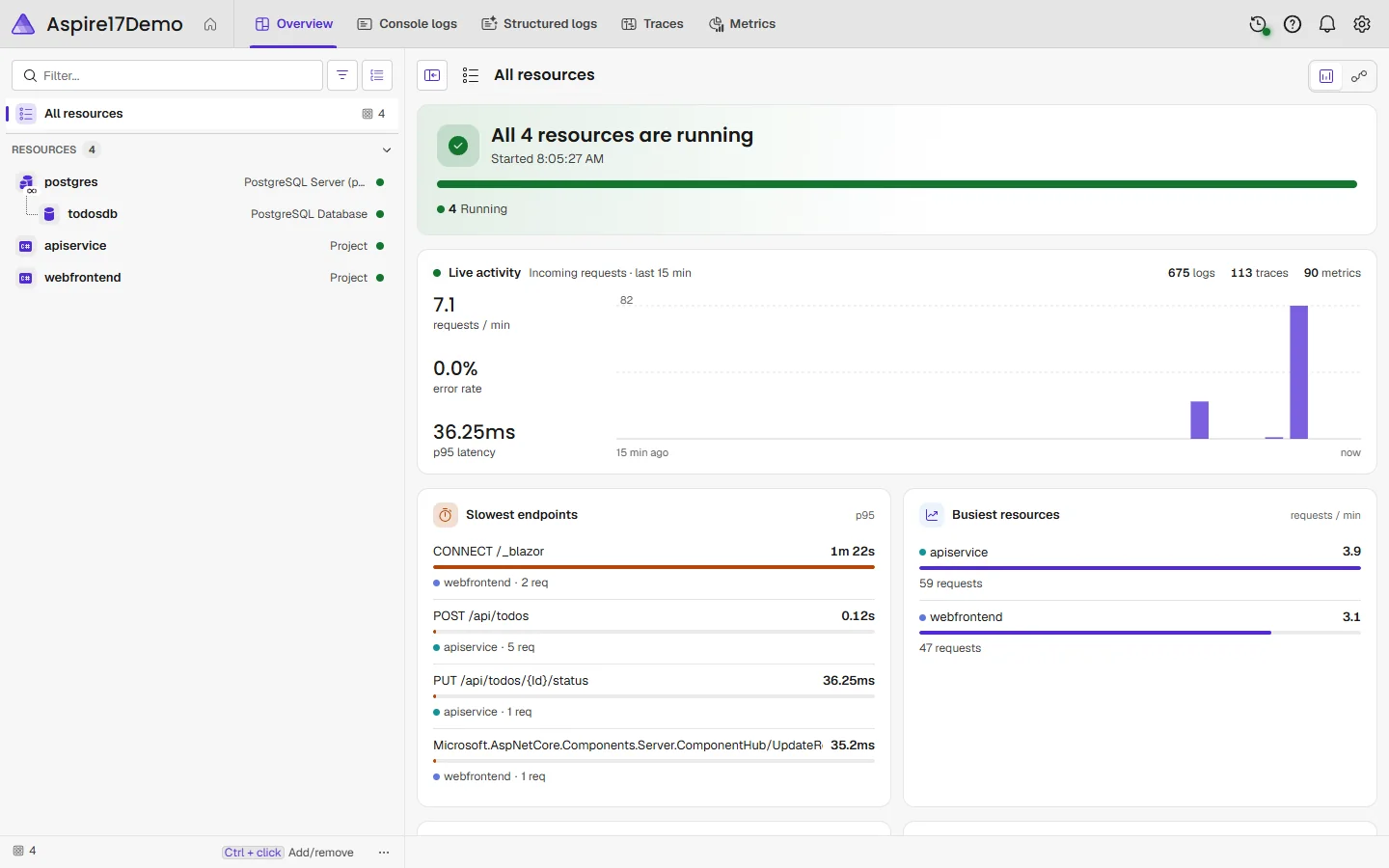
I spun up a small demo app (a Blazor front end, a C# API, and a PostgreSQL database) to take the new dashboard for a spin. Here’s what’s new.
The “All Resources” Summary
Select All resources and you get a summary of your whole app at a glance: whether everything is running, live request activity and error rate, your slowest endpoints, and your busiest resources.
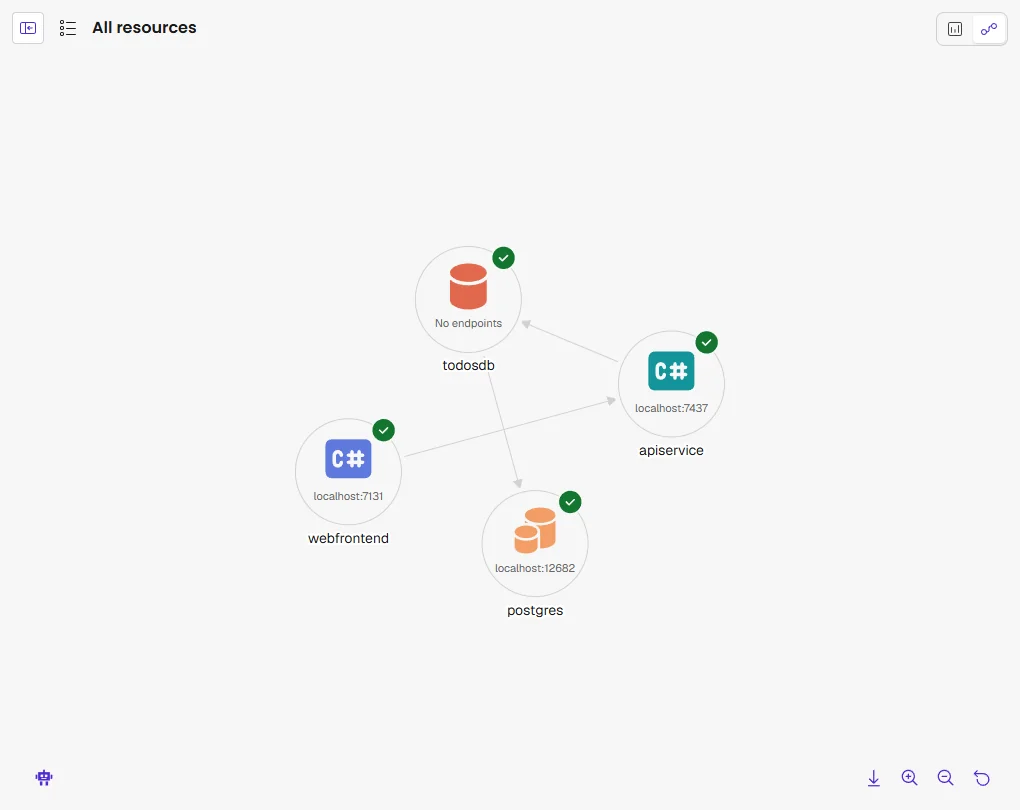
Flip the toggle in the top-right corner and you get the resource graph instead, showing how your services and their dependencies connect. This is also where you’ll find Aspire Outage, but more on that in a moment.
Resource Details
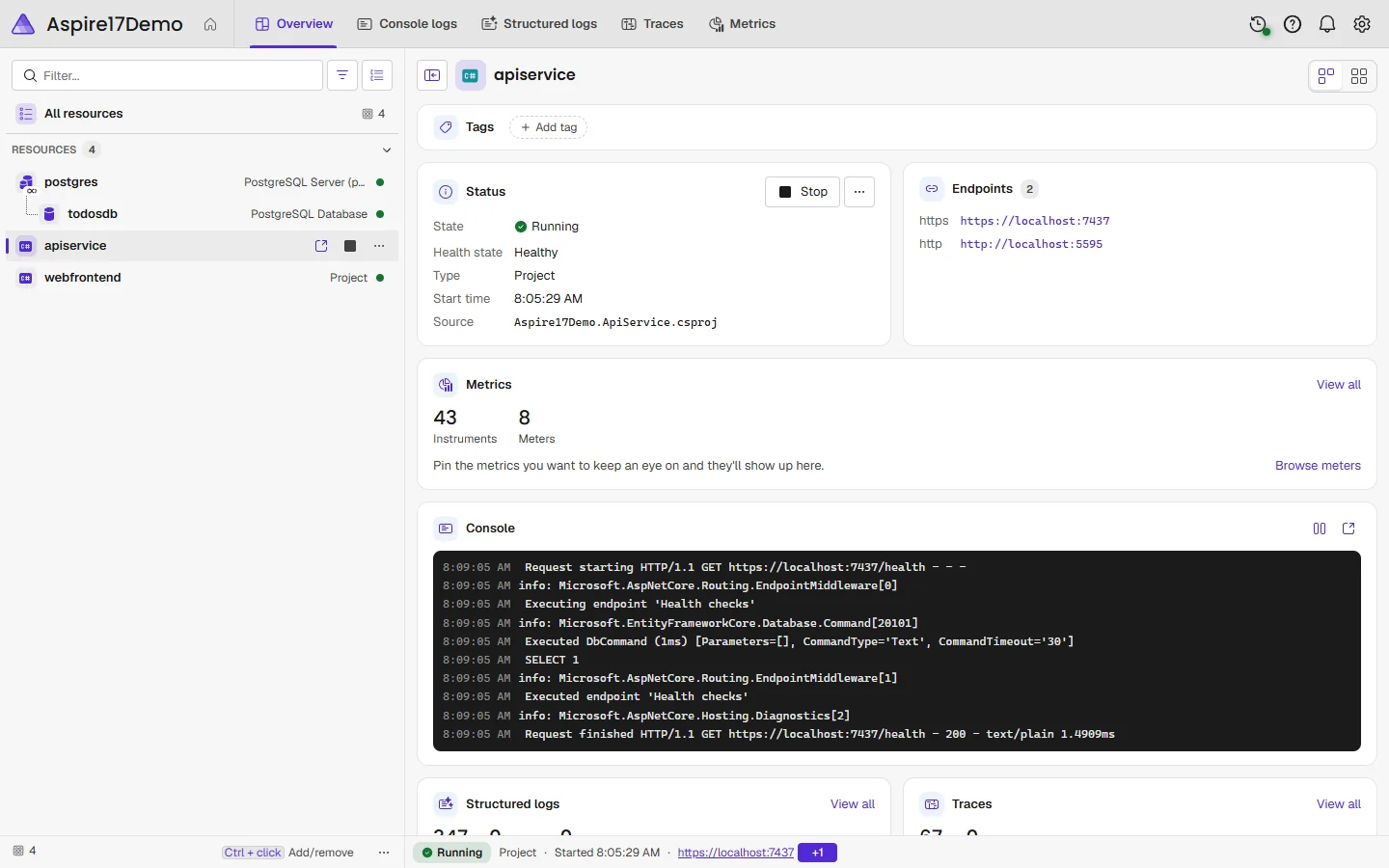
Select a single resource and its status, endpoints, metrics, console output, structured logs, and traces all come together in one view. No more jumping between pages to piece together what one service is doing.
Tags
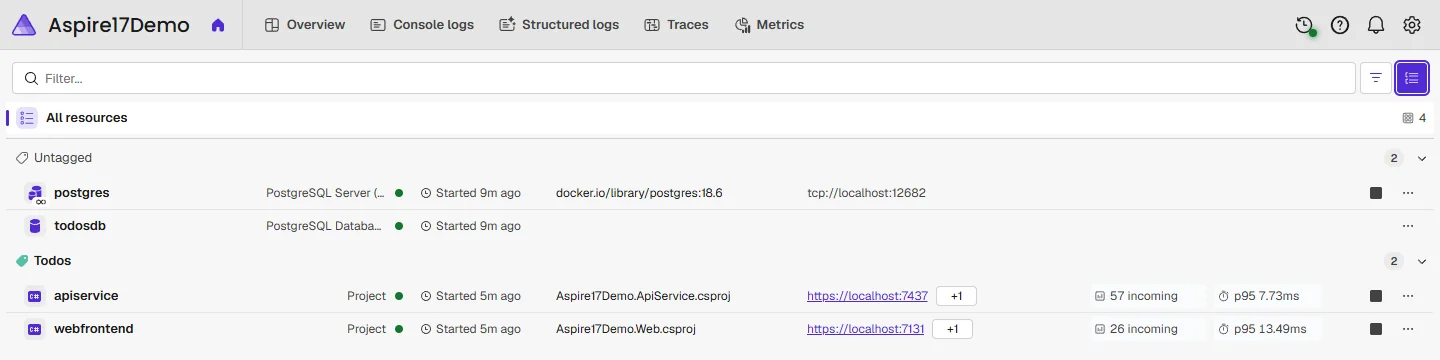
You can tag resources in your AppHost by team or subsystem, then group the resource list by tags, resource type, or state with the Group resources button. You can also add your own personal tags right in the dashboard, without touching the AppHost. Here I’ve added a “Todos” tag to the API and front end and grouped by tags. Bigger apps will benefit from this one most.
Here’s what tagging looks like in a C# AppHost. Note that WithTags is still experimental in 17, so you’ll need to suppress its diagnostic:
#pragma warning disable ASPIRERESOURCETRAITS001
var signingKey = builder.AddParameter("checkout-signing-key", secret: true)
    .WithTags("Checkout");

builder.AddDotnetProject("checkout", "../Checkout/Checkout.csproj")
    .WithEnvironment("Checkout__SigningKey", signingKey)
    .WithTags("Checkout");
A Selection That Follows You
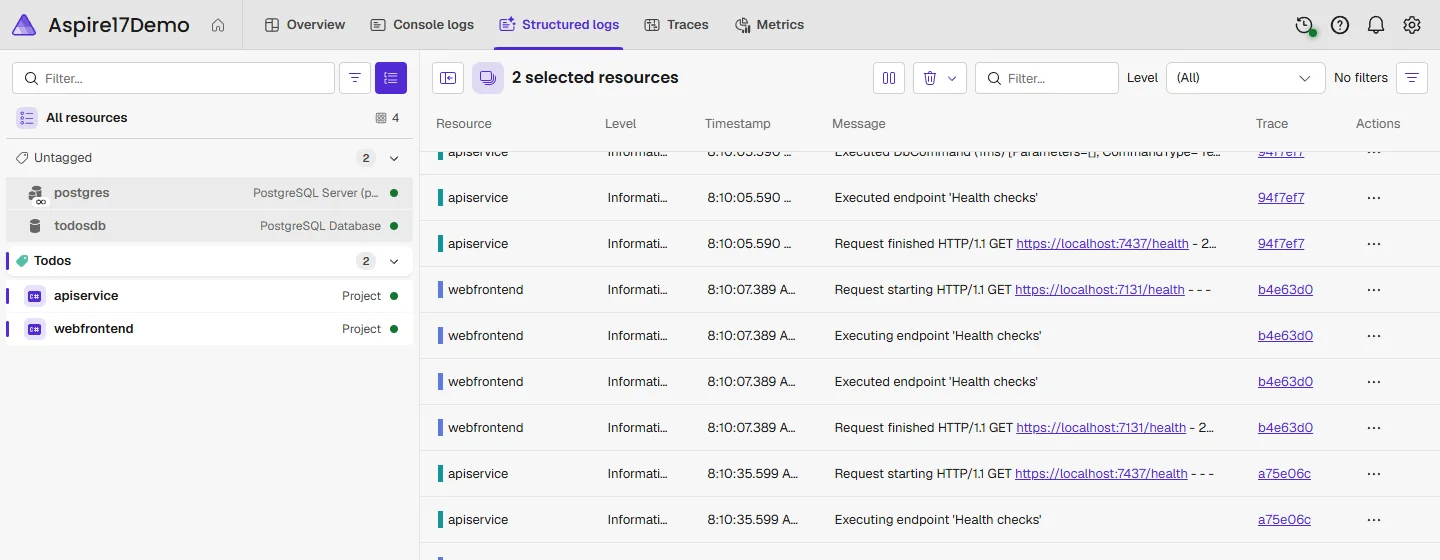
Pick the resources you care about once, Ctrl-click (Command-click on macOS) to add more, and that selection comes with you as you move between structured logs, traces, and metrics. This is the one I’m happiest about. No more rebuilding your filters on every tab.
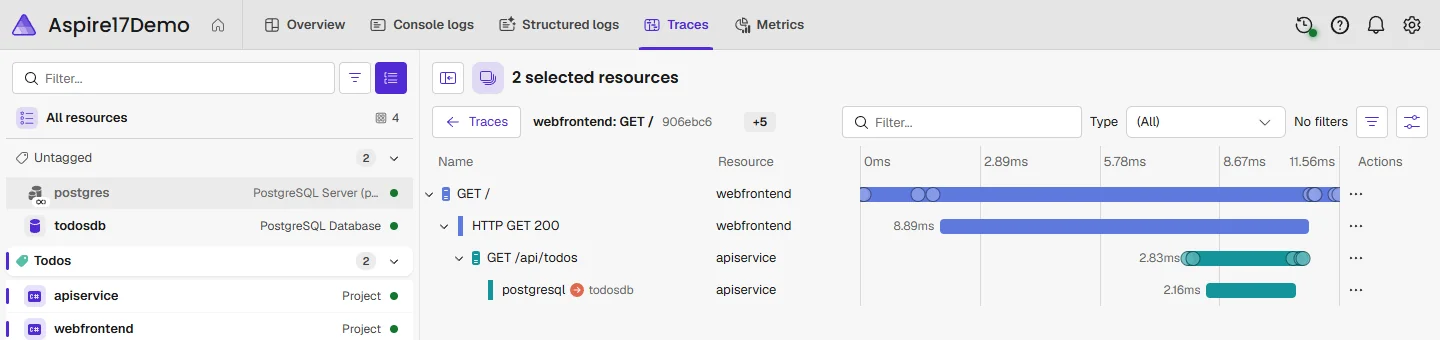
Switch over to Traces and those same two resources are still selected. Open a trace and you can follow a request from the front end, through the API, and down to the database.
Pinned Metrics
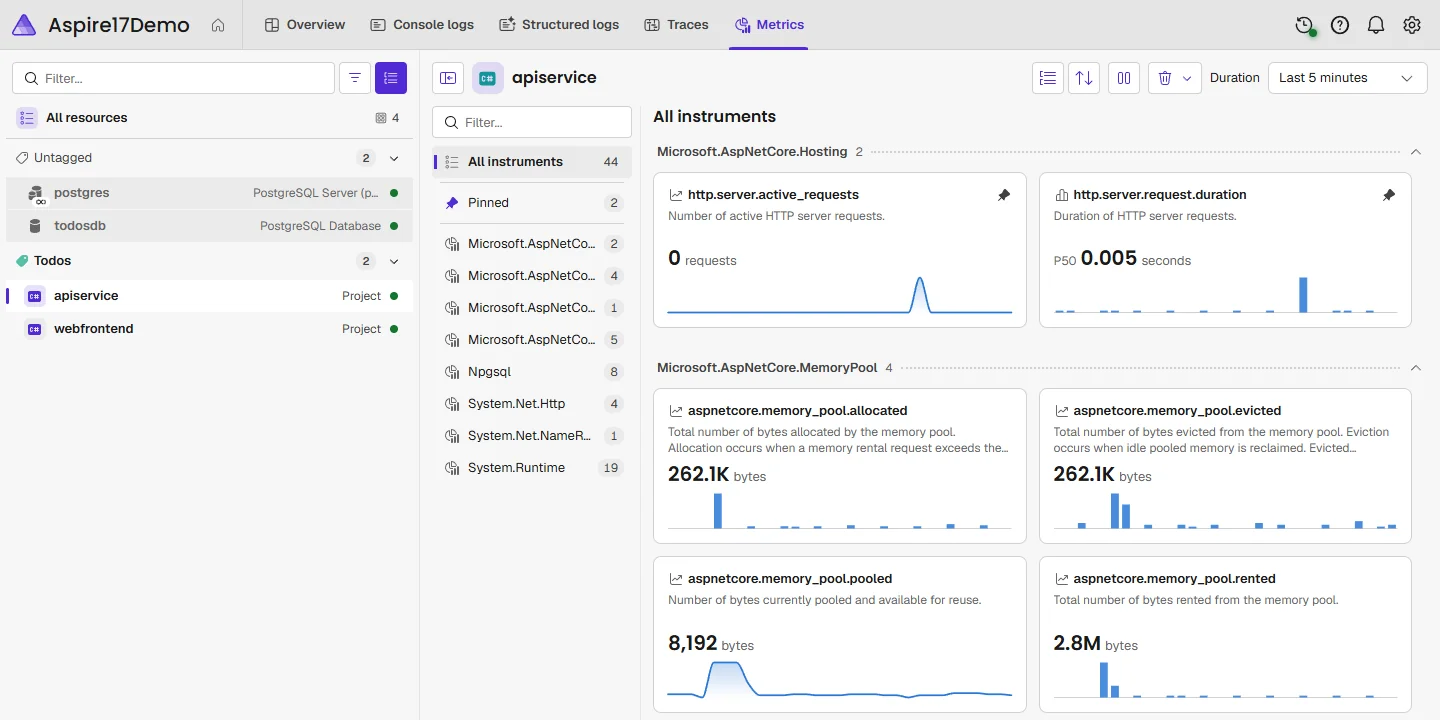
Metrics now show up as cards with live sparklines. Pin the instruments you care about, and they’re collected under Pinned in the instrument list, so you don’t have to dig through dozens of instruments every time.
And a Few More
- Terminals page. A dedicated page, with a keyboard shortcut (E) to get there.
- SQL syntax highlighting. Available in the text visualizer.
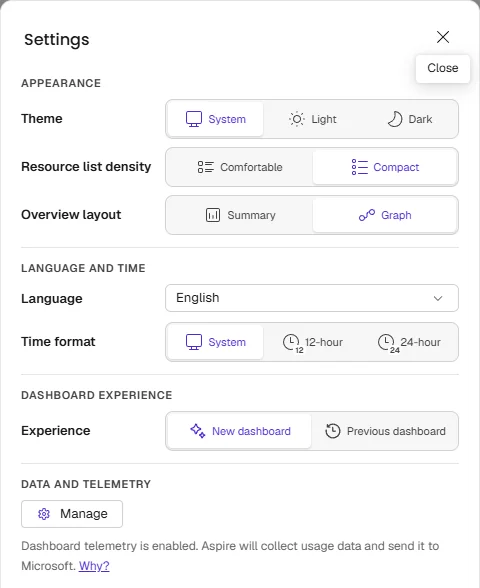
And if the new experience isn’t working for you yet, open Settings and choose Previous dashboard under Dashboard experience to switch back.
Finally, if you need a break while your containers start, press OOO on the resource graph to play Aspire Outage, a little game where your resources are the enemies. Just be careful with hardcore mode. That one really stops your resources.
The CLI Grows Up Some More
When I revisited the Aspire CLI in October, I said it had become the center of the Aspire experience. Aspire 17 keeps that going.
Secrets Management
There’s a new set of aspire secret commands, and they support environment-specific secrets. That means your production database password doesn’t need to live next to your local one. Even better, you don’t have to put the secret on the command line, where it ends up in your shell history. Leave the value off and you get a masked prompt, or read it from an environment variable with --envvar:
aspire secret set Parameters:database-password --environment Production --envvar DATABASE_PASSWORD
If you leave off --environment, the secret commands default to Development. Secrets now live in Aspire-owned files under ~/.aspire/secrets/. If you have tools or scripts that edit .NET user-secrets files directly, check the secret migration guidance before you upgrade. To find the store for the environment in the example above, run aspire secret path --environment Production.
Shell Completion
Finally! Tab completion for Aspire commands and options in Bash, Fish, PowerShell, and Zsh:
aspire completions script bash > aspire-completion.bash
source ./aspire-completion.bash
Bring Your Own Templates, Integrations, and Skills
This one’s aimed at teams. You can now point the CLI at your own sources for the things it scaffolds:
- Templates.
aspire new --template-repository <git-url>creates a project from a template in a Git repository, andaspire template source addsaves that repository for next time. Fork the Azure/aspire-templates repo, make it your own, and your whole team starts from the same place. - Integrations. Add an
integrationSourcesentry toaspire.config.jsonthat points at your own NuGet feed, and your team’s hosting packages show up inaspire add. - Skills. A
skillSourcesentry pointsaspire agent initat your team’s own agent plugins.
{
  "integrationSources": {
    "team": {
      "source": "https://nuget.example.com/v3/index.json",
      "patterns": ["Team.Hosting.*"]
    }
  }
}
A platform team can bundle all three into one Git-backed configuration source. Point the CLI at it with the ASPIRE_INIT_SOURCE_URL environment variable, and aspire new or aspire init offers that source and asks before adopting it. These are shared defaults, not enforced policy, so each developer still decides what to adopt.
A word of caution: templates and agent plugins can contain executable code. Only add sources you trust. The CLI will ask you to confirm before it registers one.
A Tray Companion
If you’re like me and have several AppHosts running in different terminals, aspire tray start puts them in your menu bar or system tray, so you don’t have to go hunting for them. It’s in preview.
Keeping Your Coding Agent Current
In Aspire and Your Coding Agent, Revisited, I walked through aspire agent init and the skill files it dropped into your repo. Those files got your agent started, but they left you wondering which copies to commit and whether they were still current.
In Aspire 17, Aspire’s agent guidance ships as a plugin instead. Your coding agent, whether that’s Claude Code, GitHub Copilot, Codex, or OpenCode, installs and updates it through its own plugin system. That means updates no longer wait for a new Aspire CLI release, and you don’t have Markdown files to refresh in every repo. If you ran aspire agent init before, review any old local skill files, because they could override the newer guidance.
There’s also a handy new way to show your agent, or your teammates, what’s running right now:
aspire describe --format mermaid
That prints the running app’s resource graph as a Mermaid diagram. Paste it into a PR description or your docs instead of the architecture diagram someone drew last year. The dashboard can export it too.
And if you use the Aspire extension for VS Code, you can now attach the debugger to a running .NET or Go resource without restarting it.
New Integrations
Two new Azure integrations arrive in preview:
- Microsoft Entra ID (
Aspire.Hosting.Azure.EntraId) lets you model app registrations and service principals right in your AppHost, or reference ones you already manage. Note that this hands identity configuration to your services. It doesn’t add authentication middleware for you, so you still need to set that up in each app. - Azure API Management (
Aspire.Hosting.Azure.ApiManagement) lets you define an API gateway with its APIs, backends, and policies, and import OpenAPI documents. It’s deployment-only, so it isn’t provisioned duringaspire run.
There are some nice updates to existing integrations too. Azure Web PubSub can now run locally with an emulator using RunAsEmulator, the Azure Service Bus emulator can reuse an existing SQL Server resource instead of spinning up its own, and Deno hosting is now stable.
Deployment
In Aspire: From Run to Production, I walked through the deployment targets and what was actually usable. Aspire 17 moves the Kubernetes story forward:
- The
Aspire.Hosting.KubernetesandAspire.Hosting.Azure.Kubernetespackages are now stable. Some APIs, like persistent volumes, are still experimental. Aspire.Hosting.Kubernetestargets any existing Kubernetes cluster, locally or in any cloud. Generate Helm charts for your own deployment pipeline, or letaspire deployapply them using your current Kubernetes context.- Helm-based deployment now requires Helm 4.0.0 or later.
- You can target an existing AKS cluster instead of having Aspire provision a new one, and Aspire deploys your workloads without reconfiguring the cluster’s settings. This was a big gap for anyone with a platform team that owns the cluster.
- The environment-specific secrets from earlier carry through to deployment. Set a Staging secret with
aspire secret set ... --environment Staging, then runaspire deploy --environment Staging. - Azure Front Door can connect to Aspire-provisioned Container Apps and App Service environments through Private Link. That one is still experimental.
On top of that, a long list of APIs graduated from experimental to stable, including pipelines, WithHttpProbe, WithMcpServer, the Dockerfile builder, and user secrets. If you’ve been suppressing those experimental diagnostics in your .editorconfig, project files, or #pragma directives, you can clean those up now.
Breaking Changes to Check Before You Upgrade
Beyond the SDK and project model changes above, here’s what to look for. The official list in the what’s new page is short, but I’ve added a few from the release change log that I think are worth knowing about:
- Legacy client packages are gone.
Aspire.RabbitMQ.Client.v6andAspire.MongoDB.Driver.v2no longer get new releases. Switch toAspire.RabbitMQ.Client(RabbitMQ.Client 7.x) andAspire.MongoDB.Driver(MongoDB.Driver 3.x), and work through those libraries’ own migration guides. - Azure Cosmos DB’s
configureClientOptionscallback now receives anIServiceProvideras well as the options. Add the parameter and rebuild. - Docker Swarm’s
MaxFailureRatiois now adouble?instead of astring?. Change"0.3"to0.3. ResourceUrlAnnotation.DisplayOrderis now a property instead of a field. Rebuild anything that uses it.- Aspire-managed AKS clusters default to the Standard control-plane tier. Redeploying the infrastructure of an existing Aspire-managed cluster can also switch it to Standard and incur a cluster management charge. If you want to stay on the Free tier, set the tier explicitly in your AppHost rather than relying on the default.
- The default maximum OTLP request size dropped from 128 MiB to 64 MiB.
- Dashboard product telemetry now goes directly to Azure Monitor and no longer follows your IDE’s telemetry setting. If you want to opt out, set
ASPIRE_DASHBOARD_TELEMETRY_OPTOUT=true.
Upgrading
Update the CLI first, then run aspire update from the root of your repository, and finally refresh your agent setup. If you installed the CLI using the install script, run:
aspire update --self
aspire update
aspire agent init
If you installed the CLI through npm, as a .NET tool, or through Nix, aspire update --self prints the package manager command to run. Run that command before updating your projects. If your repository pins the CLI, start with plain aspire update and follow the restore or install instructions it prints.
The AppHost migration is manual. The old SDK and AddProject calls still work with obsolete warnings, so you can upgrade first and migrate after. But if your build treats warnings as errors, like ours often do, expect ASPIRE012 and the CS0618 obsolete warnings to break the build right away. Either suppress them while you migrate or plan to do the migration as part of the upgrade.
Wrapping Up
Aspire 17 is a cleanup release as much as a feature release. Moving away from the custom SDK and the generated Projects.* types makes a C# AppHost look a lot more like any other .NET project, and that’s a good thing. The path-based project model also puts C# on the same footing as the TypeScript and Go AppHosts, which already worked this way. Add in the redesigned dashboard, Go AppHosts in preview, an agent plugin that keeps itself current, environment-specific secrets, and stable Kubernetes packages, and there’s a lot here to like.
Just don’t skip the breaking changes list, and give yourself some time for the AddDotnetProject migration in larger AppHosts. In a future post in this series, I’ll walk through migrating a real AppHost and share what I ran into along the way.
Resources
- Aspire 17 is ready for primetime
- What’s New in Aspire 17.0
- Upgrade Aspire
- Migrating from AddProject to AddDotnetProject
- Migrating off Aspire.AppHost.Sdk
- Aspire 17.0 Change Log
And if you want to catch up on the rest of my 2026 look at Aspire: